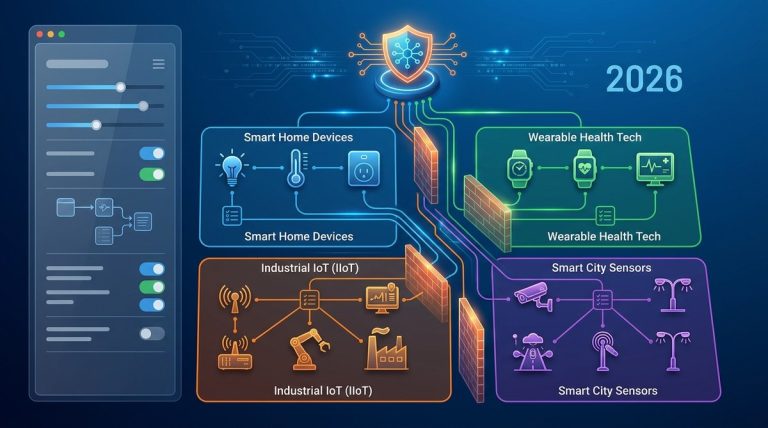
If you manage a network with hundreds or thousands of connected thermostats, security cameras, smart sensors, and industrial controllers, you already know the problem. These devices talk to the internet, to each other, and sometimes to servers you never approved. Without proper segmentation, a compromised smart light bulb can become a gateway to your entire corporate network. Proxy server rules offer a clean, manageable way to enforce boundaries between IoT traffic and everything else. Let’s walk through how to set this up for real.
IoT devices are notoriously insecure and should never share a network segment with critical business systems. Proxy server rules let you isolate device traffic, control which external hosts they reach, and log every connection. By configuring source IP filters, destination allowlists, and protocol restrictions, you create a segmented environment that limits lateral movement and contains breaches. This guide covers the practical rules you need.
Why IoT Devices Need Their Own Proxy Rules
Most IoT devices ship with minimal security. They run old firmware. They use hardcoded credentials. They phone home to servers in countries you do not control. And they often cannot be patched easily. Putting them on the same network segment as your file servers, databases, or employee workstations is a risk no security architect should accept.
A proxy server sits between the IoT devices and the internet. It can inspect traffic, block unauthorized destinations, and enforce strict rules about what protocols are allowed. Unlike a firewall that only looks at IP addresses and ports, a proxy can understand application layer data. That means you can block an IoT camera from sending video data to an unknown cloud service while still allowing it to reach its vendor’s NTP server for time synchronization.
The goal is simple. Create a set of proxy rules that treat IoT traffic as untrusted. Allow only what is necessary. Deny everything else.
Step by Step: Configuring Proxy Rules for IoT Segmentation
Here is a practical process you can follow for any modern proxy server, whether you use Squid, HAProxy, Nginx, or a commercial solution like WinProxy.
Step 1: Assign IoT Devices to a Dedicated VLAN or Subnet
Before the proxy can enforce rules, it needs to know which traffic belongs to IoT devices. Create a separate VLAN for all IoT endpoints. Give it a non overlapping IP range. For example, use 10.10.100.0/24 for IoT devices while your corporate network uses 10.10.0.0/24.
This step is critical because your proxy rules will reference source IP ranges. If IoT devices are scattered across multiple subnets, you will spend forever maintaining rules.
Step 2: Route All IoT Traffic Through the Proxy
Configure your network gateway or DHCP server to push proxy settings to IoT devices. For devices that do not support proxy configuration, use a transparent proxy setup. The transparent proxy intercepts traffic on port 80 and 443 without requiring client side configuration.
Make sure DNS resolution for IoT devices also goes through the proxy. This prevents devices from bypassing your rules by using external DNS servers.
Step 3: Define Allowlists for Destination Domains and IPs
This is where the real segmentation happens. Create an allowlist of the only external hosts your IoT devices are permitted to contact. For each device type, research the legitimate update servers, telemetry endpoints, and time servers it needs to function.
Your proxy rules should look something like this:
- Allow IoT subnet to reach vendor update server at updates.vendor.com on port 443.
- Allow IoT subnet to reach NTP pool at pool.ntp.org on port 123.
- Allow IoT subnet to reach specific cloud API at api.vendor.com on port 443.
- Deny all other outbound traffic from IoT subnet.
Block any destination that is not explicitly required. This includes social media sites, advertising networks, and unknown IP ranges.
Step 4: Restrict Protocols and Methods
IoT devices should not be making arbitrary HTTP POST requests to random servers. Restrict allowed HTTP methods to GET and HEAD for most devices. Only allow POST or PUT if the device has a legitimate need to send data to a vendor API.
Also block protocols that are rarely needed for IoT, such as FTP, Telnet, and SMB. If a device tries to initiate an SSH connection outbound, that is a red flag. Log it and block it.
Step 5: Enable Deep Packet Inspection for Known IoT Protocols
Some IoT devices use MQTT, CoAP, or AMQP instead of HTTP. Your proxy should be configured to inspect these protocols if possible. For MQTT, you can allow connections only to specific broker addresses and topics. For CoAP, restrict to known resource paths.
Not all proxy servers support deep inspection of these protocols out of the box. If yours does not, consider placing a protocol aware gateway in front of the proxy for those specific devices.
Step 6: Log Everything and Monitor for Anomalies
Enable logging for all IoT traffic passing through the proxy. Store logs in a centralized SIEM or log analysis platform. Set up alerts for any blocked connection attempts. A sudden spike in denied traffic from an IoT device often indicates a compromise.
Review logs weekly. Look for devices trying to reach new destinations that were not on the allowlist. Update your rules as needed.
Common Mistakes in IoT Proxy Segmentation
Even experienced engineers make errors when setting up these rules. Here is a table of what to watch for.
| Mistake | Why It Is Dangerous | How to Fix It |
|---|---|---|
| Using broad allowlists like 0.0.0.0/0 for any rule | Defeats segmentation entirely | Always specify exact destination IPs or domains |
| Allowing all HTTP methods | Lets devices upload data to any server | Restrict to GET and HEAD unless proven necessary |
| Forgetting to block DNS leaks | Devices can use DNS tunneling to bypass proxy | Force DNS through the proxy or block external DNS |
| Not segmenting by device type | A compromised smart bulb can attack a medical sensor | Create separate proxy rules per device category |
| Ignoring IPv6 traffic | Rules only apply to IPv4, leaving a gap | Block or route IPv6 traffic through the proxy as well |
Expert Advice on Rule Maintenance
“The most common failure I see is that engineers set up IoT proxy rules once and never touch them again. Device firmware updates change the endpoints they call. New device types get added. Old devices get replaced. Your proxy rules need a quarterly review cycle, just like your firewall policies. Automate the testing of your rules using a staging environment before pushing changes to production.” — Senior Network Architect, Fortune 500 manufacturing firm
This advice rings true. Set a calendar reminder to review your IoT proxy rules every three months. Check vendor documentation for any new required endpoints. Remove rules for devices that have been decommissioned.
Building a Rule Set for Different IoT Device Classes
Not all IoT devices have the same traffic patterns. Grouping them by function makes rule management easier.
Environmental Sensors and Controllers
These devices typically send small amounts of data to a central server at regular intervals. They rarely need to receive inbound connections. Allow outbound connections only to the specific server IP or domain that collects their data. Block all inbound traffic.
Security Cameras and Video Doorbells
Cameras generate high bandwidth traffic. They often stream video to cloud storage services. Allow connections only to the vendor’s streaming endpoint. Block peer to peer connections between cameras unless you have a local recording server. If you use a local NVR, route camera traffic to the NVR through the proxy and do not allow direct outbound internet access.
Smart Building Controllers (HVAC, Lighting, Access Control)
These devices may need to sync with a central management platform. They also may need to receive firmware updates. Create rules that allow outbound connections to the management platform and to a specific update server. Block all other traffic. If the controller supports local management only, do not give it internet access at all.
Medical IoT Devices
Patient monitors, infusion pumps, and other connected medical devices have strict compliance requirements. They often need to connect to a hospital’s internal monitoring system but should never touch the public internet. Use proxy rules that allow traffic only to internal servers. If a vendor requires internet access for telemetry, create a very narrow allowlist for that specific purpose and log every connection.
Testing Your Proxy Rules Before Deployment
Before you apply new rules to production IoT devices, test them in a lab environment. Set up a few representative devices on a test VLAN. Route their traffic through a staging proxy with the proposed rules. Monitor for any legitimate traffic that gets blocked.
Use a tool like curl or wget from a test machine in the IoT subnet to confirm that allowed destinations work and denied destinations are blocked. Check both IPv4 and IPv6 paths.
If you want a deeper look at validating your configuration, read our guide on how to test and validate proxy rules before corporate deployment. It covers common edge cases that catch engineers off guard.
Automating Rule Updates for Large Deployments
If you manage more than a few hundred IoT devices, manual rule updates become a burden. Consider using a configuration management tool like Ansible or Puppet to push proxy rule changes across your fleet of proxy servers. Store your rules in version control so you can roll back changes quickly.
For dynamic environments where IoT devices are added frequently, look into integrating your proxy with an asset management database. When a new device is registered, its required destinations are automatically added to the allowlist. This reduces the chance of human error.
Monitoring for Compromise Using Proxy Logs
Your proxy logs are one of the best tools for detecting compromised IoT devices. A device that suddenly starts trying to reach servers in a country where it has no business is a strong indicator of malware.
Set up automated alerts for these scenarios:
- An IoT device attempts to connect to a known malicious domain
- An IoT device makes more than 100 outbound connections per minute
- An IoT device uses a protocol that is not in its allowlist
- An IoT device tries to reach internal IP ranges that are not its own
For more on turning logs into actionable intelligence, check out our article on why your proxy server logs are a goldmine for network security analytics in 2026.
Integrating Proxy Rules with Zero Trust Architecture
IoT segmentation fits naturally into a zero trust model. The proxy enforces the principle of least privilege for every device. No device is trusted by default. Every connection is verified against policy.
If you are building a zero trust network, your IoT proxy rules become a key enforcement point. Combine them with micro segmentation at the firewall level and strong device authentication. A device that cannot authenticate should not even reach the proxy.
For guidance on making this work without breaking existing applications, see our guide on how to configure a proxy server for zero trust network access without breaking legacy apps.
The Role of a Forward Proxy in IoT Segmentation
A forward proxy is the right tool for outbound IoT traffic. It sits between the devices and the internet. It can cache responses, filter content, and enforce authentication. Unlike a reverse proxy which protects servers, a forward proxy protects your internal network from the outside.
For IoT devices that need to access the internet only for specific purposes, a forward proxy with strict allowlists is the simplest and most effective solution.
Final Thoughts on Keeping IoT Traffic Under Control
IoT devices are not going away. Their numbers will only grow. Every new sensor, camera, or controller that connects to your network is a potential entry point for attackers. Proxy server rules give you a way to contain that risk without crippling the functionality your organization depends on.
Start small. Pick one device type, create rules for it, and test thoroughly. Expand from there. Over time, you will build a comprehensive set of rules that keeps your IoT traffic segmented and your core network safe.
Set up your rules, monitor the logs, and review them regularly. That is the pattern that works. Your network will be more secure, and you will sleep better knowing that a compromised smart thermostat cannot bring down your entire enterprise.