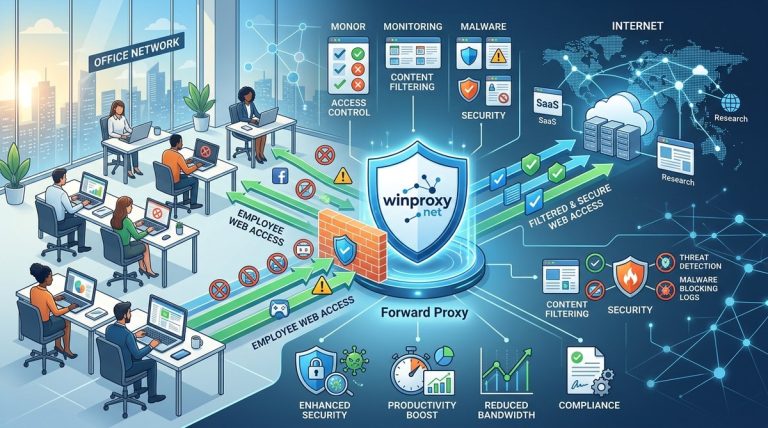
You manage a network where every click matters. One wrong download, one streaming video during peak hours, one visit to a sketchy site, and your whole operation can slow down or worse, get infected. That is where forward proxy employee web access control comes in. It is not just a firewall add on. It is the central checkpoint for everything your team does online. Think of it as a gatekeeper that can log, allow, block, or speed up traffic based on rules you set. In 2026, with remote work still a big part of many companies and cloud apps everywhere, having that control is more important than ever.
A forward proxy gives IT administrators complete visibility and granular control over employee internet traffic. It blocks threats, enforces acceptable use policies, and optimizes bandwidth. By placing a proxy between users and the open web, you can log every request, filter content, and prevent data leaks without constantly chasing after individual endpoints. This guide covers why it works and how to implement it today.
What a Forward Proxy Actually Does
A forward proxy sits between your employees' devices and the internet. When someone in your office types a URL, their browser sends the request to the proxy first. The proxy evaluates that request against your rules, then either forwards it, blocks it, or caches the response. This setup means you see everything. Every site visited, every file downloaded, every login form submitted. And because the proxy is on your network, you can enforce policies before traffic reaches its destination.
Many IT teams confuse forward proxies with reverse proxies. A reverse proxy protects backend servers from outside users. A forward proxy protects your internal users from the outside world. For employee web access control, you want the forward kind.
Why Your Team Needs Forward Proxy Employee Web Access Control
Let's be honest. Employees are not malicious, but they are busy. They click links in emails without thinking. They watch YouTube tutorials during lunch. They log into personal accounts on company machines. A forward proxy handles all of that quietly.
Monitor and Log Everything
Compliance is a big deal in 2026. Whether you follow HIPAA, GDPR, or just your own internal audit rules, you need records of who accessed what. A forward proxy logs every URL, timestamp, and user. You can generate reports for HR, legal, or security teams in minutes.
Block Threats Before They Hit
Malware often hides in ads, malicious redirects, or compromised sites. A forward proxy can use threat intelligence feeds to block known bad domains. No need to install an agent on every laptop. The proxy handles it at the network level.
Enforce Acceptable Use Policies
Some employees will try to stream Netflix or play online games during work hours. You can set policies that only allow certain categories (work related) and block others (entertainment, social media). Or you can allow them during lunch and block them during core hours. The proxy makes this granular control easy.
Save Bandwidth and Improve Performance
Caching is a side benefit many admins forget. If ten people visit the same software update page, the proxy saves a copy of the static files and serves them locally. This reduces internet usage and speeds up access. Combine that with bandwidth limits on non essential sites, and your critical applications will run smoother.
How to Implement a Forward Proxy for Employee Web Access Control
Here is a practical, numbered list of steps. Adjust for your network size and existing infrastructure.
- Choose your proxy software or appliance. Options range from open source solutions (Squid, HAProxy) to commercial products (your WinProxy platform fits here). Pick one that supports authentication, content filtering, and logging.
- Deploy the proxy on a dedicated server or virtual machine. Place it in a DMZ or directly on your internal network. Ensure it has enough CPU and RAM to handle peak traffic.
- Configure network routing. Usually this means setting the proxy as the default gateway for HTTP/HTTPS traffic in your firewall, or using a transparent proxy mode that intercepts port 80 and 443 requests. Alternatively, push proxy settings to browsers via Group Policy or MDM.
- Define your access control rules. Start with a block list of known malicious sites. Then create categories: allowed, restricted, blocked. For example, allow all work related domains, block torrent sites, restrict streaming to low bandwidth during business hours.
- Enable logging and monitoring. Point your proxy logs to a SIEM or a simple log server. Set up alerts for repeated blocked access attempts or unusual traffic patterns.
- Test with a small group before full rollout. Check that authentication works (LDAP/Active Directory integration is typical). Verify that no critical business apps break because of caching or content filtering.
- Train employees. Send a short email: “We are adding a proxy to improve security and speed. Your browsing experience will not change, but some sites may load slower or be blocked. If you need access to a work related site that is blocked, contact IT.” That sets expectations.
Common Mistakes and Best Practices
| Mistake | Best Practice |
|---|---|
| Blocking too aggressively, causing legitimate work to fail | Start with a whitelist of approved categories and add exceptions as needed. |
| Not handling HTTPS traffic | Enable SSL/TLS inspection with a trusted certificate, so you can see inside encrypted connections. |
| Forgetting to cache static assets | Configure caching for large files (OS updates, software installers) to reduce bandwidth costs. |
| Ignoring user authentication | Tie proxy access to Active Directory so you can identify who is doing what. |
| No failover plan | Deploy two proxy servers in a load balanced pair to avoid downtime. |
Benefits at a Glance
Here is a bulleted list of what you get with a well configured forward proxy:
- Centralized logging and reporting for compliance and audits.
- Reduced malware infections by blocking dangerous domains.
- Better bandwidth management by limiting non work traffic.
- Improved employee productivity when distracting sites are restricted.
- Policy enforcement that works even if employees use personal devices on the guest network (by routing guest traffic through a separate proxy with different rules).
- Lower latency for frequently accessed resources thanks to caching.
“The biggest win for us was visibility. Before the proxy, we had no idea how much traffic was going to gaming servers and streaming sites. After we deployed forward proxy employee web access control, we cut our bandwidth usage by 40% in the first month. Plus, we caught three phishing campaigns that had slipped past our email filter.” – Sarah, Senior Network Engineer at a mid sized law firm.
Handling HTTPS and Privacy Concerns
Modern web traffic is mostly encrypted. A forward proxy can still inspect that traffic if you install a trusted root certificate on employee devices. This is called SSL decryption. It sounds invasive, but when done transparently, users hardly notice. The proxy decrypts the request, checks the URL and content, then re encrypts it before sending it to the destination. Some users may worry about privacy. Be clear in your policy: only work related traffic is monitored, and personal browsing is better done on personal devices or through a separate WiFi network.
Choosing the Right Proxy for Your Company
Not all proxies are equal. For employee web access control, you want one that integrates with your directory service, supports URL categorization, and can scale to your user count. Check out our guide on how to choose the best proxy server for your network security needs for a deeper breakdown. If you already have a proxy in place but it is underperforming, read about optimizing proxy server performance for enterprise networks to tune your setup.
Moving from Theory to Action
You have read the benefits. Now is the time to plan your deployment. Start small. Pick a department, configure the proxy, and measure the difference. You will see fewer support tickets for malware, happier users because the network feels faster, and a clear log of all web activity. In 2026, the threat landscape is only getting more complex. Forward proxy employee web access control is one of the simplest, most effective layers you can add.
Taking the Next Steps for Your Network
Set a date for your pilot. Gather a list of the top 50 domains your team uses daily. Write your initial rules. Talk to your team about the change. Then flip the switch. You will be glad you did. And if you get stuck, our resources on mastering proxy server configuration for advanced network security can guide you through the finer details.
Your network deserves a gatekeeper that works as hard as you do. Forward proxy employee web access control is that gatekeeper. Deploy it, tune it, and enjoy the peace of mind that comes with knowing exactly what is flowing through your pipes.