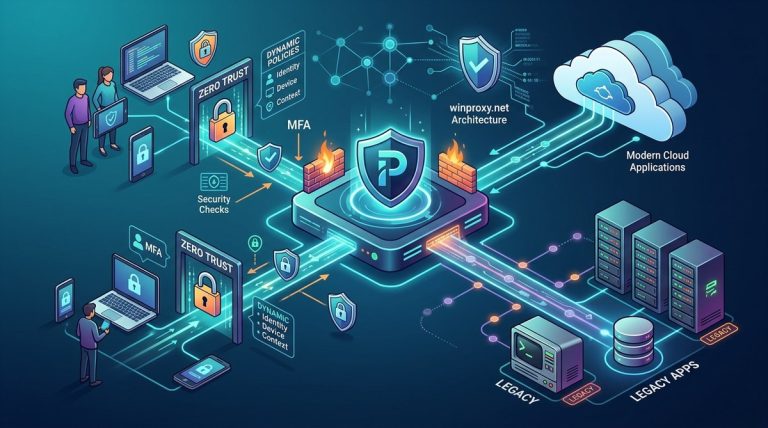
You are a network security engineer or IT architect. You have been tasked with implementing Zero Trust Network Access (ZTNA). The mandate is clear: no device or user gets implicit trust. Every request must be verified, authorized, and logged. But there is a catch. Your organization runs legacy applications. Old ERP systems. Custom built client server tools. Maybe even a mainframe connected application that uses hard coded IP addresses and non standard ports. These apps were not designed for a world where the network is considered hostile. They break the moment you try to enforce strict policy enforcement at the network layer. This is the real challenge of zero trust proxy server configuration. It is not about the theory. It is about making it work in the messy reality of a mid to large enterprise.
A successful zero trust proxy server configuration requires three things: a forward proxy that performs identity aware inspection, a per application allowlist for legacy traffic, and a phased migration plan that uses policy exclusions only as a temporary bridge. Do not block legacy traffic first. Instead, use a logging only mode to discover hidden dependencies. This guide shows you the exact steps to configure your proxy server for ZTNA without breaking the apps your business relies on every day.
The Core Conflict Between Zero Trust and Legacy Apps
Zero Trust means you verify everything. Legacy applications often assume they are already inside the trusted network. They skip authentication. They use unencrypted protocols. They connect to servers by IP address instead of DNS names. When you place a proxy server between the client and the resource, these assumptions fall apart.
A classic example is an old Windows based application that connects to a database server on port 1433. The application does not support proxy configuration. It does not understand HTTP CONNECT. It expects a direct TCP connection. If you force all traffic through a standard forward proxy that only handles HTTP and HTTPS, the application simply fails. Users get connection timeouts. They call the help desk. The project gets labeled as disruptive.
The solution is not to abandon Zero Trust. It is to configure your proxy server with a layered approach that understands the difference between modern web traffic and legacy application traffic. You need a proxy that can handle both transparently and a policy engine that can make granular decisions based on application identity, not just source IP.
Step by Step: Configuring Your Proxy for ZTNA
Here is a practical process you can follow. This assumes you are using a modern forward proxy like WinProxy or a similar solution that supports policy based routing, TLS inspection, and non HTTP protocol handling.
-
Map all legacy application flows first. Before you change any proxy rules, run a traffic capture tool for at least two weeks. Identify every IP, port, and protocol that legacy applications use. Look for hard coded IP addresses, non standard ports, and protocols like LDAP, SMB, or RDP that may need special handling. Document each flow with the application name, the business owner, and the risk level.
-
Deploy the proxy in logging only mode. Configure your proxy server to receive traffic but not block anything. Set the proxy as the default gateway for a pilot group of users. Let the proxy log all requests. This gives you a baseline of what the legacy apps actually do. You will be surprised by the number of unexpected connections. For example, an old HR app might phone home to a vendor server that no longer exists. You need to know this before you write any deny rules.
-
Create application specific allowlists. For each legacy application, create a policy that allows its traffic through the proxy without inspection, but only if the traffic matches the exact destination, port, and protocol you documented. Use IP based rules as a last resort. Prefer rules based on application identity if your proxy supports client certificate authentication or agent based identification. This is the heart of zero trust proxy server configuration: you are not trusting the network location. You are trusting the verified application identity.
-
Enable TLS inspection for modern traffic only. Do not attempt to decrypt legacy application traffic that uses self signed certificates or no encryption at all. It will break. Configure your proxy to bypass TLS inspection for traffic that matches your legacy application allowlist. For all other traffic, enforce full TLS inspection to detect malware, data exfiltration, and policy violations.
-
Test with a small group. Roll out the configuration to a pilot group of users who rely on the legacy applications. Monitor the proxy logs for denied traffic. If an application breaks, check the logs to see why. It is usually a missing rule for a secondary connection you did not catch during the mapping phase. Add the rule and retest.
Common Mistakes and How to Avoid Them
Even with a solid plan, it is easy to make mistakes. Here is a table of the most common errors and the corrections.
| Mistake | What Happens | How to Fix It |
|---|---|---|
| Blocking all non HTTP traffic | Legacy apps that use raw TCP or UDP fail immediately | Configure your proxy to support TCP tunneling or use a separate SOCKS5 proxy for non HTTP traffic. Read more about the difference in SOCKS5 vs HTTP proxies. |
| Enforcing TLS inspection on all traffic | Apps with self signed certificates or certificate pinning break | Create a certificate bypass list for known legacy applications. Only inspect traffic from modern browsers and SaaS tools. |
| Using source IP as the only identity | A compromised workstation can pretend to be a legacy app | Use client certificates or agent based authentication to verify the application, not just the device. |
| Rolling out to everyone at once | A single broken app causes a flood of support tickets | Use a phased rollout. Start with a pilot group. Monitor logs for a week. Then expand. |
| Forgetting about DNS resolution | Legacy apps that use host files or direct IPs bypass proxy rules | Ensure your proxy server can handle IP based requests. Configure DNS policies to redirect traffic through the proxy. |
Expert advice: The most critical step is the logging only phase. Do not skip it. I have seen teams spend weeks configuring rules based on assumptions, only to discover that their legacy CRM system connects to an external time sync server on UDP port 123. That one missing rule caused a two day outage. Log first. Block later. It saves you from the fire drills.
How to Handle the Top Three Legacy Application Types
Not all legacy applications are the same. They fall into three broad categories. Each requires a slightly different approach.
Client Server Applications with Hard Coded IPs
These are the most painful. The application has the server IP address compiled into the binary. You cannot change it. The application does not use DNS. It does not support proxy configuration. The only way to make this work with Zero Trust is to use a network level redirect. Configure your proxy server to intercept traffic destined for that specific IP and port. The proxy then forwards the traffic to the actual server, but only after verifying the client identity. This is essentially a transparent proxy for a single flow. It is not elegant, but it works. For more on this technique, see how to deploy a reverse proxy.
Web Based Legacy Applications Without Modern Security
Many older web applications run on HTTP, not HTTPS. They use basic authentication. They are vulnerable to session hijacking. For these, you can use your proxy server to upgrade the connection. The proxy terminates the HTTP connection from the client, then opens a new HTTPS connection to the application. This gives you encryption on the wire without modifying the application. You can also inject modern security headers like HSTS and X Frame Options at the proxy level. Check out implementing advanced proxy server configurations for optimal privacy for more details.
Applications That Use Non Standard Ports
Some legacy apps use ports that are normally associated with other services. For example, a custom application might use port 443 for a proprietary protocol instead of HTTPS. Your proxy server might try to inspect this as HTTPS traffic and fail. The fix is to create a protocol specific rule. If the application uses a custom protocol, configure the proxy to tunnel the traffic without inspection. If the application uses a known protocol like RDP or SSH, you can apply protocol specific security checks. For RDP, you can enforce multi factor authentication at the proxy level. For SSH, you can log all session commands.
Building a Phased Migration Plan
You cannot flip a switch and move everything to Zero Trust overnight. You need a plan that respects the business need for uptime. Here is a realistic timeline.
- Week 1 2: Discovery and logging only mode. Map all legacy traffic.
- Week 3 4: Build application specific allowlists. Test with a pilot group.
- Week 5 6: Enable Zero Trust enforcement for modern traffic. Keep legacy traffic on allowlists.
- Week 7 8: Work with application owners to modernize legacy apps. This might mean adding TLS support, moving to a newer version, or replacing the app entirely.
- Week 9 10: Remove temporary allowlists. All traffic now goes through Zero Trust enforcement.
During this process, you will need to monitor proxy server health and performance. If the proxy becomes a bottleneck, users will blame the security project. Make sure you have adequate capacity. For tips on keeping your proxy running smoothly, see optimizing proxy server performance for enterprise networks.
What to Do When an Application Still Breaks
Despite your best efforts, some applications will break. Do not panic. Follow these steps.
- Check the proxy logs for the exact time of the failure. Look for a denied connection or a failed TLS handshake.
- Identify the destination IP and port. Compare it to your documented flows.
- If the destination is unknown, contact the application owner. Ask them what the application does when it connects to that address.
- If the connection is legitimate, add a rule to allow it. If it is not, work with the owner to remove the dependency.
- Document the fix. Update your application allowlist.
This iterative process is normal. Every enterprise has hidden dependencies. The goal is not to have zero failures on day one. The goal is to have a process for resolving failures quickly.
Tying It All Together: A Zero Trust Proxy That Works in Practice
Zero trust proxy server configuration is not a one time setup. It is a continuous process of discovery, policy creation, and refinement. The legacy applications that cause friction today are the same ones that will force you to build better detection and exception handling. Over time, you will replace or upgrade those applications. Your proxy configuration will become simpler. But in the meantime, you need a system that handles both modern and legacy traffic without breaking the business.
Start with the logging only phase. Build your allowlists based on real data, not assumptions. Use a phased rollout. And always have a rollback plan. If you follow this approach, you can implement Zero Trust Network Access without a single help desk ticket about a broken legacy app. Your users will not even notice the change. That is the sign of a well executed configuration.
For a deeper look at how to secure your proxy infrastructure against the threats that target these legacy gaps, read the ultimate guide to securing proxy servers against modern threats. And if you are still deciding on the right proxy for your environment, our guide on how to choose the best proxy server for your network security needs can help you make an informed decision.
The work is worth it. A properly configured zero trust proxy gives you visibility, control, and security without sacrificing productivity. Your legacy apps can coexist with modern security standards. You just need the right configuration and a patient, data driven approach.